

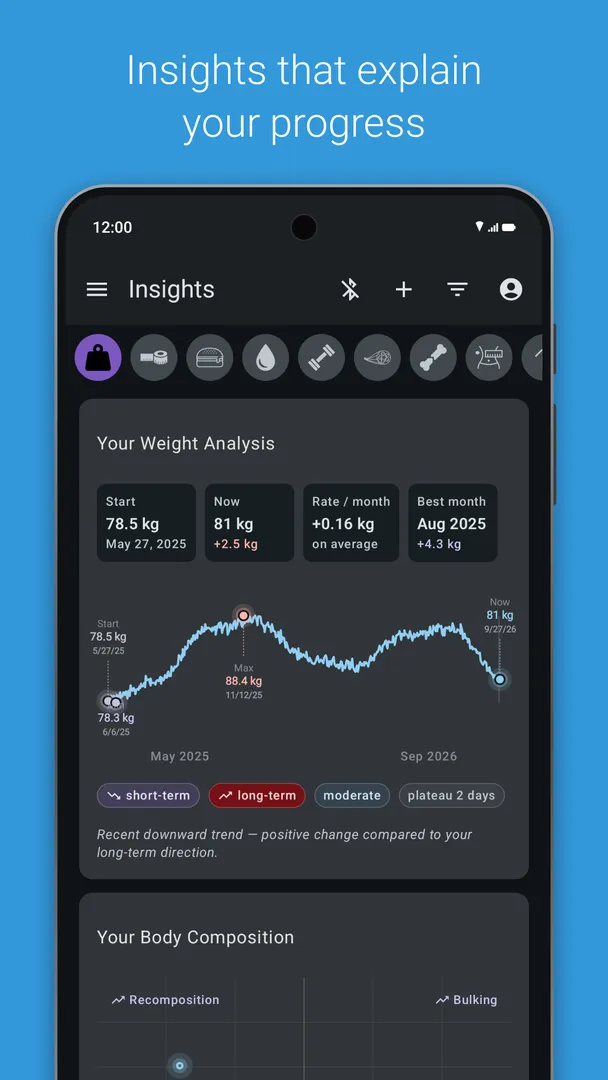

openScale is an open source Android app for tracking weight, BMI, body fat, body water, muscle and many other body metrics, with built-in support for a range of Bluetooth bathroom scales. It does not need an account, it shows no ads, and the data stays under your control.
You can connect a supported smart scale and let readings arrive automatically, or type measurements in by hand if your scale has no Bluetooth or is not supported yet. Graphs, a table, goals and range feedback show how you are doing over time.
This page explains what the app does, which scales and metrics it covers, what each permission is for, how to install the APK, what the F-Droid build means, and where the app has limits.

What is openScale?
openScale is a body metrics tracker developed by olie.xdev and licensed under GPL-3.0-only. Its main job is to record measurements such as weight, BMI, body fat, body water and muscle, and then show them on graphs and in a table so trends are easy to spot.
Many smart scales come with an app from the manufacturer. The project describes itself as an alternative that reads data from many of those scales directly. Brands named in the description include Beurer, Sanitas, Yunmai, Xiaomi, Medisana, Silvercrest and others. The developers say that, together with users, they keep improving and extending the set of supported scales, and in many cases pick up where the original app falls short.
openScale is built around privacy. It does not require you to create an account, it has no ads, and it lets you decide what to do with your data. You can import or export everything as a CSV file. The location permission is only needed to find a Bluetooth scale, and the developers note it can be revoked afterward, or never granted if you do not use Bluetooth.
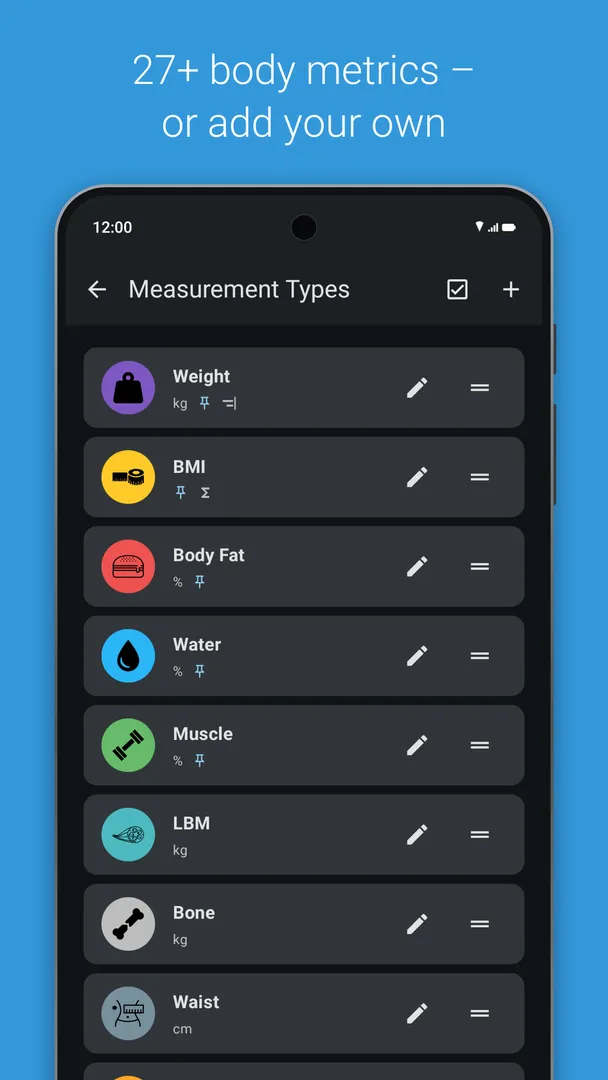
You can also set which metrics appear. The list of supported metrics is long, but anything you do not use can be disabled and hidden, so the screen only shows what you care about.
Key features of openScale
- Bluetooth scale support: The app has built-in support for a number of BLE or "smart" scales from many manufacturers, including Beurer, Sanitas, Yunmai and Xiaomi. Once paired, measurements come in from the scale instead of being typed by hand. The project wiki lists each supported model and its level of support.
- Quick manual entry: For scales without Bluetooth, or Bluetooth scales that are not supported yet, you can enter measurements by hand in a quick and simple way. This means openScale works with any scale, smart or not, as long as you are willing to type the numbers.
- Wide range of metrics: Track weight, BMI, body water, muscle, lean body mass, body fat, bone mass, visceral fat, BMR and many circumference measurements, including waist, hip, chest, thigh, biceps and neck. Waist-to-height and waist-hip ratios and body fat caliper readings are also supported.
- Configurable display: Metrics you do not use can be disabled and hidden. A person who only weighs themselves sees a short, clean screen, while someone tracking a full set of body measurements can turn on everything they need.
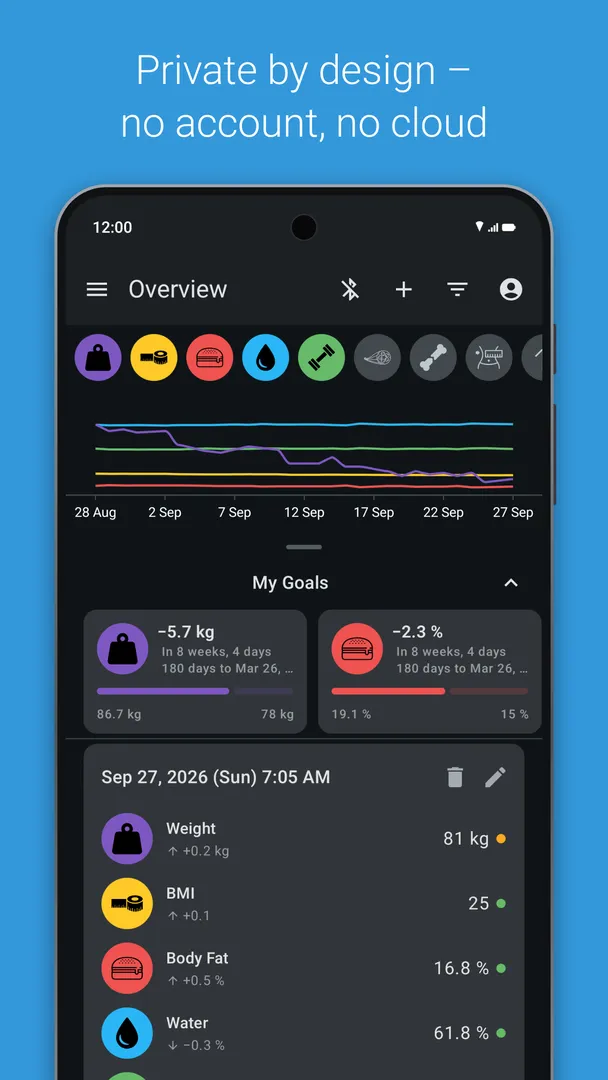
- Charts, table and range feedback: All data appears on a chart and in a table. It evaluates measurements and gives quick visual feedback on whether a value is inside or outside the recommended range for your age, sex and height.
- Goals and units: Set a goal to help keep your diet on track, and pick kilograms, pounds or stones as the weight unit. Each entry can have an optional comment, useful for noting a change in routine or the time of day.
- Estimations for missing values: If your scale does not measure body fat, body water or lean body mass, openScale can estimate them using methods based on scientific publications. The estimates help fill gaps for owners of simpler scales.
- Multiple users, widget and CSV: Several users can share one openScale installation, a resizable home screen widget shows the latest measurement, and all data can be imported from or exported to a CSV file. An optional dark theme is available, and the interface is translated into many languages.

openScale permissions explained
Here is every permission the APK declares. On modern Android, sensitive permissions such as location and Bluetooth scanning are requested at runtime, so you decide when to grant them. The description states that the app requests no unnecessary permissions.
- Connect to Bluetooth devices: Lets openScale connect to paired Bluetooth devices. This is how it talks to a supported smart scale.
- Find Bluetooth devices: Lets the app scan for nearby Bluetooth devices. This is sensitive. It is needed to discover your scale before the first connection.
- Run at startup: Lets the app start itself after the device boots. The description does not say which feature uses it.
- Show notifications: Lets the app show notifications. Android 13 and newer ask first.
- Control vibration: Lets the app make the device vibrate.
- Prevent sleep: Keeps the device awake while a task runs, which can help while waiting for a scale reading.
- View network connections: Lets the app check whether the device is online and which network type is in use.
- Run in the foreground: Keeps a visible notification while the app works in the background.
- Bluetooth settings: Lets the app discover and pair Bluetooth devices, which is part of setting up a scale.
- Advertise to Bluetooth devices: Makes the device visible to nearby Bluetooth devices. The description does not explain which scales need this.
- Precise location: Reads the device's precise GPS location. This is sensitive. The developers state that location is only needed to find a Bluetooth scale and can be revoked once the scale is found.
- Approximate location: Reads the device's approximate location. This is sensitive and is covered by the same explanation: it is tied to finding a Bluetooth scale, and can be left ungranted if you do not use Bluetooth.

How to download and install openScale APK
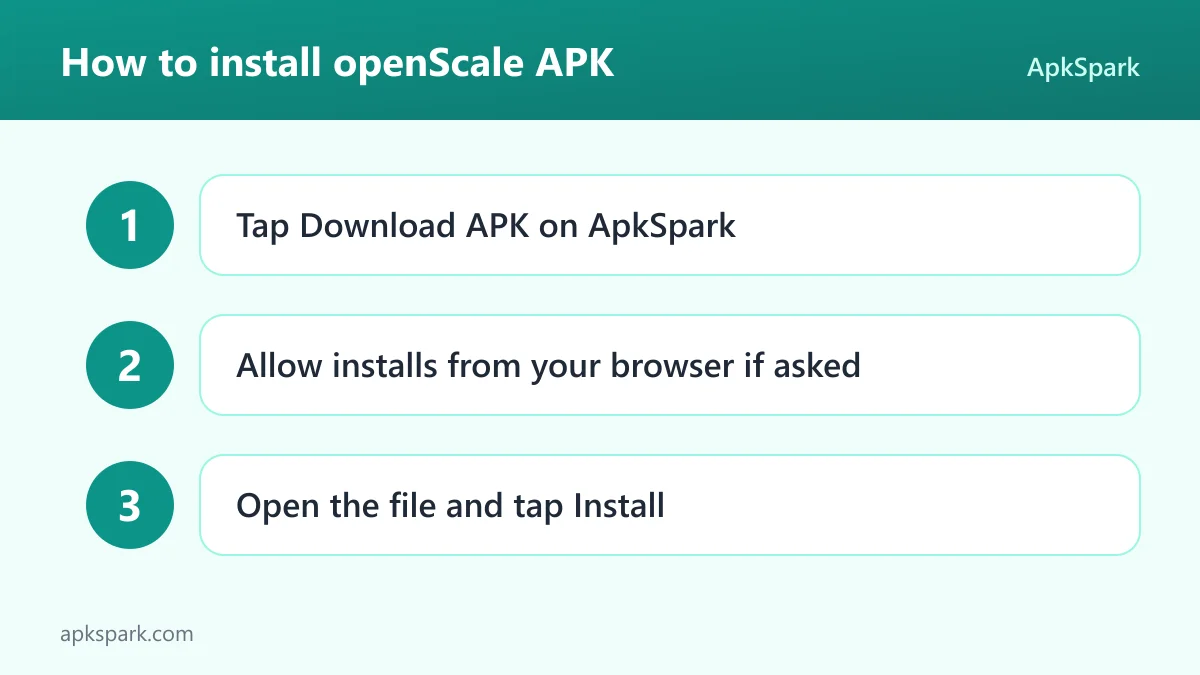
- Tap the Download button on this page to get the APK.
- When Android asks, allow installs from your browser.
- Open the downloaded file from your notifications or the Downloads folder.
- Tap Install and wait for the confirmation.
- Open the app and set up your user profile.
If you have not installed an APK outside a store before, or the install is blocked, see our guide to installing APK files. It explains the settings involved and how to fix common errors.
Is openScale safe?
openScale is free and open source software under the GPL-3.0-only license. The full code is public in the openScale source code repository on GitHub, so anyone can check how it handles Bluetooth, permissions and your data.
The APK on this page comes from F-Droid. F-Droid builds this APK from the published source code and signs it with the F-Droid key, and the file is downloaded from the official f-droid.org repository. You can check the same package on the F-Droid listing. F-Droid lists no anti-features for this app.
The privacy claims in the description are concrete. The app needs no account, shows no ads, and asks for location only to find a Bluetooth scale. Data export to CSV is under your control. Since F-Droid signs the APK, updates should also come from F-Droid builds. Switching to a copy signed by someone else requires uninstalling first, so export your data as CSV before you do.
The project is run in the open. Bugs, ideas and questions go to the issue tracker on GitHub, which is also where the description asks people to report problems. When a scale misbehaves, include the exact model name in your report, since support is handled model by model. The releases page lists what changed in each version.
openScale system requirements
- Minimum Android version: Android 12.
- Download size: 31.5 MB.
- Supported ABIs: arm64-v8a, armeabi-v7a, x86 and x86_64.
- Version: 3.1.4.
- Release date: November 4, 2026.
Bluetooth scale support needs a phone with Bluetooth and a scale model the app supports. Without either, manual entry still works. Note the Android 12 minimum for openScale 3.1.4: older phones cannot install this version.
Supported Bluetooth scales in openScale
The description names a selection of supported models and points to the project wiki for the full list and the level of support for each one. Models named include:
- Beurer and Sanitas: Beurer BF700, BF710 and BF800, and Sanitas SBF70.
- Medisana and Silvercrest: Medisana BS444 and BS440, and Silvercrest SBF75.
- Xiaomi and Yunmai: Xiaomi Mi scale v1 and v2, and Yunmai Mini and SE.
- Other brands: Digoo DG-S038H, Excelvan CF369BLE, Exingtech Y1, Hesley (Yunchen), MGB, Runtastic Libra, iHealth HS3 and Easy Home 64050.
- Custom made Bluetooth scale: The list also includes a custom made scale option, plus "many more" models on the wiki.
Support levels differ between models, so check the openScale wiki for your exact scale before buying one for use with this app. A scale that is not on the list can still be used with manual entry.
The metrics openScale tracks
The metric list in openScale is long, and the description says not to worry about that, because unused metrics can be disabled and hidden. It helps to group them by what they need.
Weight is the base. BMI follows from weight and height. Body fat, body water, muscle, bone mass, visceral fat and lean body mass usually come from a scale that measures body composition. If yours does not, the app can estimate body fat, body water and lean body mass with methods based on scientific publications.
Tape measure values form a second group: waist, hip, chest, thigh, biceps and neck circumference. From those, the app works out the waist-to-height ratio and the waist-hip ratio. A body fat caliper entry covers people who measure skinfolds. BMR, the basal metabolic rate, rounds out the list.
Each entry can carry an optional comment. Range feedback shows at a glance whether a value sits inside or outside the recommended range for your age, sex and height.
How openScale handles your data
The privacy promises in the description are specific. openScale does not need an account, so there is no sign-up and no login. The app has no ads. It lets you decide what to do with your data, and the main tool for that is CSV import and export.
No cloud sync service is described. That keeps things simple: your measurements live on the device until you export them. To move to a new phone, export a CSV file, copy it over and import it there. The same file opens in any spreadsheet program if you want to run your own analysis.
Permission requests follow the same idea. The location permission is the one most people question in a health app, and the developers address it directly: it is only needed to find a Bluetooth scale, and it can be revoked once the scale is found. If you only type values by hand, you never need to grant it.
A typical first week with openScale
On first launch, set up your user with the details the app uses for range feedback, such as age, sex and height. Pick your weight unit: kilograms, pounds or stones. Then decide which metrics to show. If your scale only measures weight, hide the rest to keep the screen simple, or leave body fat, body water and lean body mass on and let the app estimate them.
If you have a supported Bluetooth scale, add it in the settings. Android asks for Bluetooth scanning and location permission at this step. After the scale is found and connected, you can revoke location if you prefer, as the developers describe.
Step on the scale and the reading should come in. If it does not, check the wiki entry for your model, since some scales are only partly supported, and make sure Bluetooth is turned on. Manual entry is always there as a fallback for that day. Without a smart scale, use manual entry each morning instead.
After a few days, open the chart and table to see the trend. Set a goal weight, add the resizable widget to your home screen so the latest value is always visible, and, if others in your home use the same phone, create a profile for each person. By the end of the week you should have enough entries for the chart to show a first trend line.
Who should use openScale?
openScale suits anyone who wants to track weight and body metrics without creating an account or using a manufacturer app. If you own a supported smart scale and dislike its official app, or worry about where that app sends your data, the alternative can read the scale directly and keep the data on your device.
It also suits people who track progress during a diet or a training plan. Goals, range feedback, a chart and a table make trends easy to see, and circumference measurements such as waist, hip and thigh help when the number on the scale alone does not tell the full story.
Families can share openScale on one phone or tablet through multiple user profiles. People without a smart scale lose nothing important: manual entry is quick, and estimations based on scientific publications fill in body fat, body water and lean body mass if needed.
It is a weaker fit for people who want automatic cloud backup, social features or workout plans. None of those are part of openScale. The app focuses on recording measurements, showing trends and keeping the data local, and it does that without extra layers. People who speak Catalan, Czech, Dutch, French, German, Greek, Italian, Japanese, Polish, Spanish, Swedish, Turkish or one of the other listed languages will find the interface partially or fully translated.
Tips for getting started with openScale
- Check your scale first: Look up your exact model on the project wiki before pairing. Support levels vary, and knowing what your scale reports avoids confusion about missing values.
- Hide unused metrics: Disable metrics you will not track. A shorter list makes daily entry faster and keeps the chart readable.
- Weigh at the same time each day: Readings vary over the day. Use the optional comment field when something changes, such as weighing after a workout.
- Revoke location after pairing: The developers note that location is only needed to find a Bluetooth scale. Once paired, you can revoke it in Android settings.
- Export a CSV backup: Export your data to CSV now and then. The file can be imported again or opened in a spreadsheet.
- Add the widget: The resizable home screen widget shows your latest measurement without opening the app.
Documented limitations of openScale
Bluetooth support depends on the scale. The description says the team keeps extending the list, which also means some scales are not supported yet, and supported ones do not all have the same level of support. In those cases manual entry is the fallback.
openScale is for information and progress tracking. Estimated body fat, body water and lean body mass values are calculations, not measurements, and range feedback is general guidance based on age, sex and height. The minimum version is Android 12, so older phones cannot run it.
Alternatives to openScale
ApkSpark has no related apps listed for this one yet. To compare other trackers for weight, workouts and health data, browse more Health & Fitness apps.
Final verdict
openScale is a privacy-friendly weight and body metrics tracker that reads data from many Bluetooth scales and works just as well with manual entry. It covers a long list of metrics, offers charts, goals, range feedback, multiple users and CSV export, and has no ads or account requirement.
The F-Droid build, GPL-3.0 license and clear explanation of the location permission make it easy to trust. If your phone runs Android 12 or newer and you want your scale data on your own terms, it is a strong choice.