WordleSolver is a small open source Android helper that suggests the next guess for Wordle and Gurgle puzzles. You copy the colored feedback from the puzzle into the app, tap a button, and it shows a list of possible next words at the bottom of the screen. The developer says it usually solves a puzzle in four tries.
The app is made by Bill Farmer, licensed under GPL-3.0-only, and distributed through F-Droid, which builds the APK from the published source code. The download is under 1 MB and runs on Android 5.0 or newer. It requests no special permissions.
This page explains how the input grid works, what the app asks of your device, how to install it, and who will get the most out of it. If you are deciding whether a word puzzle helper belongs on your phone, the sections below cover the practical details.

What is WordleSolver?
WordleSolver is a puzzle assistant rather than a game of its own. It does not contain daily puzzles or a scoreboard. Instead, it works next to a word puzzle you are already playing, such as Wordle or Gurgle, and narrows down which words still fit the clues you have collected so far.
The solving logic is not written from scratch. According to its description, the app uses solver code from the PoorLazyCoder Wordle-Solver project on GitHub, wrapped in an Android interface built by Bill Farmer. The Android part adds the input grid, the keyboard handling, multiple colored themes and support for multiple languages.
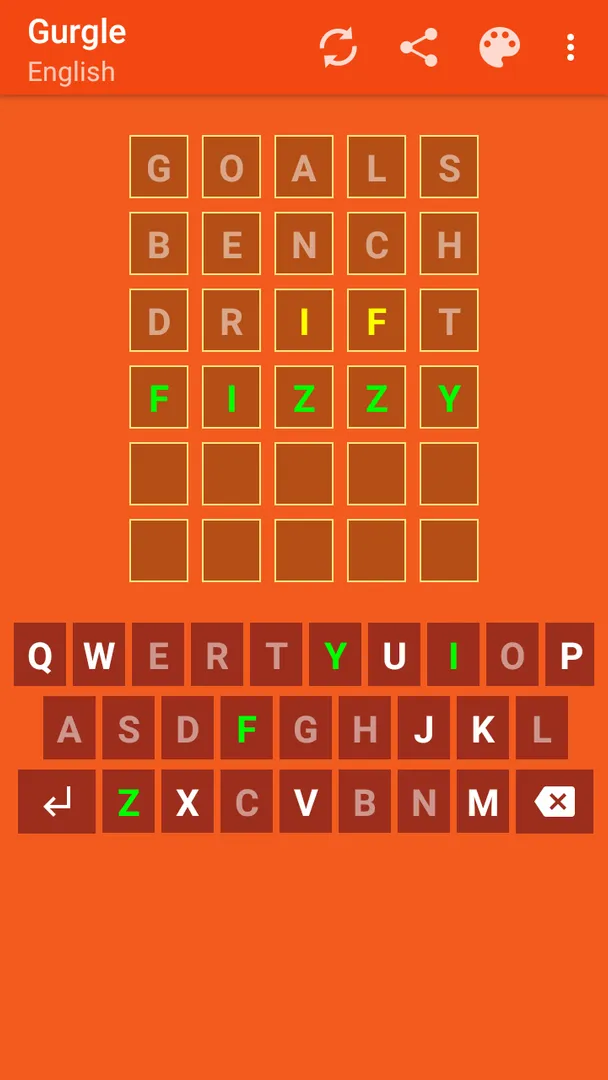
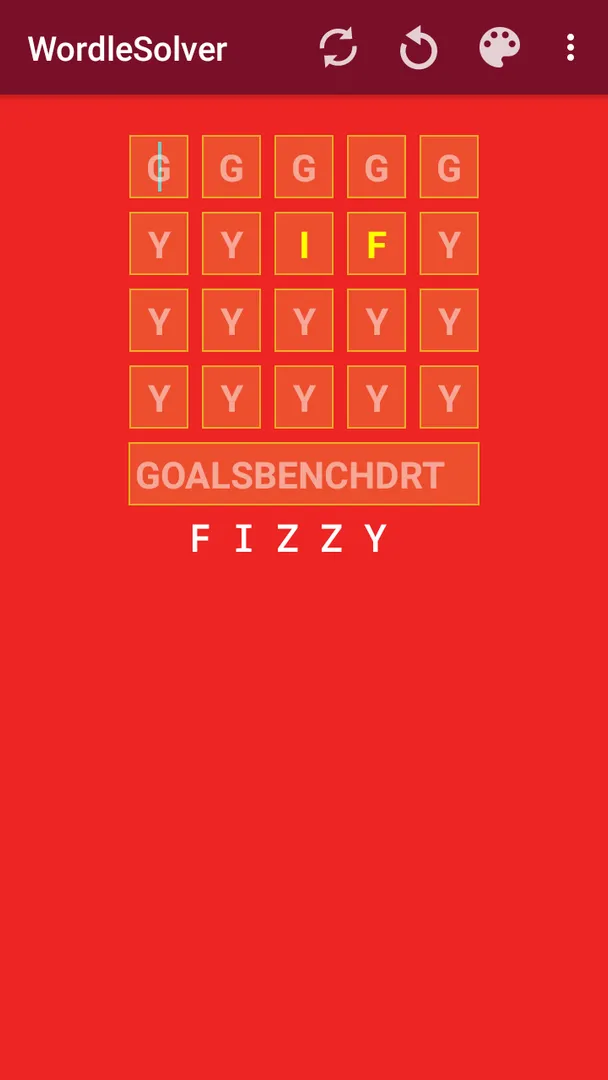
The workflow follows the colors a Wordle-style game gives you. Green letters are in the right spot. Yellow letters are in the word but in a different spot. Grey letters are not in the word. WordleSolver has rows for each of these, and you type letters into the matching rows.
Once you have entered your clues, you tap the solve button in the toolbar or the next button on the keyboard. The app then shows a list of words that could be your next guess. You pick one, type it into the real puzzle, read the new colors, and repeat.
Because WordleSolver only reads what you type, it never connects to the puzzle site or reads your screen. That keeps it simple and explains why it needs no permissions at all.
Key features of WordleSolver
- Wordle and Gurgle support: The app is designed for both Wordle and Gurgle puzzles. Any puzzle that shows feedback as green, yellow and grey letters fits the same input layout, but the description names only these two, so treat other games as untested territory.
- Usually solves in four tries: The developer states that the app usually solves Wordle and Gurgle puzzles in four tries. That is a typical result, not a guarantee, and how fast you reach the answer still depends on the words you choose to play from the suggestion list.
- Green rows for fixed letters: Letters shown green in the puzzle go into the first green row, each in its correct position. This tells the solver which positions are already settled so it can discard every candidate word that has a different letter in those slots.
- Yellow rows for misplaced letters: Yellow letters go into the next yellow rows in the position where they appeared. The solver then knows the letter belongs in the word but not in that spot, which removes many candidates after only one or two guesses.
- Grey row for excluded letters: Letters shown grey go into the last row in any order. Order does not matter here, because these letters are simply ruled out. This is the quickest row to fill and often removes the largest share of possible words.
- Next button and solve button: You can start a search from the solve button in the toolbar or from the next button on the keyboard. The next button only works when there is text at the cursor, so you can also use it to move to the next slot without triggering a search.
- List of next guesses: After a search, the app shows a list of possible next guesses at the bottom of the screen. You choose which word to play, so you stay in control of the strategy instead of having the app type into the puzzle for you.
- Multiple colored themes: WordleSolver offers several colored themes. The description does not list them by name, but the option lets you pick a look that is easier on your eyes or closer to the puzzle you play.
- Multiple languages: The app supports multiple languages. The description does not say which ones, so check the language setting after installing if you need a specific interface language.
- Tiny and permission-free: The APK is about 0.9 MB and the app requests no special permissions. It does not need internet access, storage access or notifications to do its job, which makes it easy to keep installed for daily use.

WordleSolver permissions explained
WordleSolver requests no special permissions. The permission list in its package is empty, so the app cannot access the internet, your files, your contacts, your location, your camera or your notifications.
That fits how the app works. All the information it needs comes from the letters you type into its grid, and the solving runs on the device. There is nothing to download and nothing to upload.
On modern Android versions, apps must ask at runtime before using sensitive permissions such as location, camera or storage. Because WordleSolver declares none of these, you will not see any permission prompts when you open it for the first time.
If a future version ever adds a permission, Android and F-Droid will both show it before you update, so you can decide whether you are comfortable with the change.

How to download and install WordleSolver APK
- Tap the Download button on this page to get the WordleSolver APK.
- When Android asks, allow installs from your browser. This is a one-time setting for apps from outside the Play Store.
- Open the downloaded file from your notifications or your Downloads folder.
- Tap Install and wait a few seconds for the installation to finish.
- Open the app from the install screen or your app drawer.
The file is under 1 MB, so the download should be quick even on a slow connection. If this is your first time installing an app outside an app store, our guide to installing APK files walks through each Android prompt with explanations, including how to turn the unknown sources setting off again afterward.

Is WordleSolver safe?
WordleSolver is free and open source software under the GPL-3.0-only license. The full code is public in the WordleSolver source code repository on GitHub, so anyone can read exactly what the app does.
The APK offered here comes from F-Droid. As the repository note explains, F-Droid builds this APK from the published source code and signs it with the F-Droid key, and the file is downloaded from the official f-droid.org repository. You can compare details on the WordleSolver F-Droid listing.
F-Droid lists no anti-features for this app. That means it does not flag ads, tracking, non-free network services or non-free dependencies for WordleSolver.
The lack of permissions also limits what the app could do even in theory. Without internet access it cannot send anything off the device, and without storage access it cannot read your files.
If you run into a bug, the developer keeps a public issue tracker where you can read existing reports or file a new one.
WordleSolver system requirements
- Minimum Android version: Android 5.0 or newer.
- Download size: about 0.9 MB.
- Supported ABIs: universal, so the same APK works on all devices regardless of processor type.
- Current version: 1.13.
- Release date: March 24, 2026.
These requirements are modest. Almost any Android phone or tablet still in use can run WordleSolver, and the small size means it takes up very little storage. RAM and screen size requirements are not documented, but an app this small is unlikely to strain any device.
How a typical WordleSolver session works
Here is a walkthrough of one round based on the documented input rules. It assumes you have the puzzle open in a browser or another app and switch between it and WordleSolver.
Step 1: play your opening word
Make your first guess in the puzzle as usual. The app does not choose an opening word for you, so start with whatever word you normally use. When the puzzle colors the letters, note which are green, yellow and grey.
Step 2: enter the green letters
Switch to WordleSolver. Type each green letter into the first green row in the exact position it occupies in the puzzle. If a letter was green in the third position, it goes in the third slot of that row.
Step 3: enter yellow and grey letters
Type each yellow letter into the next yellow row, in the position where it appeared yellow. Then type the grey letters into the last row. For the grey row, order does not matter.
Step 4: run the search
Tap the solve button in the toolbar, or tap next on the keyboard while the cursor sits on a letter. The list of possible next guesses appears at the bottom. Pick a word, play it in the puzzle, and add the new clues to the next rows.
Step 5: repeat until solved
Each new guess adds more information, and the list shrinks. According to the developer, this usually ends in four tries.
Documented limitations
The description is short, so several things are simply not documented. It does not list the languages or themes by name. It does not explain how the word list is built or how it ranks suggestions. It also does not say whether puzzles other than Wordle and Gurgle are supported.
The four-try figure is described as usual, not certain. Some puzzles have many words that differ by one letter, and in those cases any helper may need more guesses.
The next button has a specific rule: it only works when there is text at the cursor. If you tap next on an empty slot, nothing happens. That is by design, because it lets you skip forward without starting a search.
Finally, WordleSolver does not connect to the puzzle. You must copy the colors by hand, so a typo in the grid will lead to wrong suggestions.
That manual step is also the reason the app stays so small and private. It has no account, no sync and no online component to break when a puzzle site changes its layout. The cost is a few extra taps per guess, which most people will accept once they are used to the grid.
Who should use WordleSolver?
WordleSolver suits players who enjoy Wordle or Gurgle but sometimes get stuck on the last few guesses. Instead of guessing blindly, you can see which words still fit your clues and pick from that list.
It also fits people who like to study how word puzzles narrow down. Entering clues row by row and watching the candidate list shrink shows how much each green, yellow or grey letter is worth. That can make you a better player even when you solve without help.
Finally, it is a good choice for anyone who prefers small, permission-free, open source tools. If you avoid apps with ads, trackers or network access, WordleSolver gives you a word puzzle helper with none of those concerns. If you want a word game to play, though, this is not it, because the app contains no puzzles of its own.
Using it without spoiling the fun
A helper like this can take the challenge out of a puzzle if you use it from the first guess. Many players prefer to solve on their own and open the app only when they are down to their last two or three attempts. Others use it after the puzzle is over, entering their clues to see which words they missed. The app does not track or report how you use it, so the choice is entirely yours.
Tips for getting started with WordleSolver
- Copy colors carefully: The suggestions are only as good as your input. Double-check that each green and yellow letter sits in the same position it had in the puzzle before you tap solve.
- Use next to move without searching: When you are typing a long row of clues, tap the next button on letters you have entered to jump to the next slot. Only tap solve when the grid is complete.
- Grey letters go in any order: Do not spend time arranging excluded letters. Type them into the last row as they come, because their order is ignored.
- Pick from the list yourself: The list at the bottom shows several possible guesses. Choose a word that tests new letters when you still have many options, and a likely answer when the list is short.
- Try the themes: If the default colors are hard to read, switch to another of the colored themes so the green and yellow rows stand out clearly.
- Set your language: If your device language differs from the puzzle you play, check the language option so the interface matches what you expect.
Alternatives to WordleSolver
ApkSpark does not list closely related apps for WordleSolver at the moment. If you are looking for something to play rather than a helper, you can browse more Puzzle apps on ApkSpark and compare their permissions and sizes on each page.
You can also look at other open source projects from the same developer on the Bill Farmer developer page. The developer also has an official website that links to his projects.
Final verdict
WordleSolver does one job: it turns the green, yellow and grey clues from Wordle or Gurgle into a list of next guesses. It is under 1 MB, needs Android 5.0, asks for no permissions and carries no anti-features on F-Droid.
The trade-off is that you copy clues by hand, and the description leaves details such as the word list and supported languages undocumented. If you want a light, private helper for word puzzles, WordleSolver is easy to recommend. If you want a game to play, look elsewhere in the Puzzle category.