

Mill is a free, open source Android version of Nine Men's Morris, the old strategy board game where you line up three pieces to remove one of your opponent's. It covers the classic game plus Twelve Men's Morris, Lasker Morris and the South African variant Morabaraba, with a computer opponent that has 30 difficulty levels.
The Mill app is developed by Calcitem Studio and Sanmill Developers, written in Flutter and released under the GPL-3.0-only license. The APK on this page is built by F-Droid from the public source code. Below you will find what the game offers, what each permission is for, how to install it and what your device needs.
Mill leans toward learning and practice. Alongside normal play it has an analysis engine, unlimited undo, a move list, PGN import and export, and statistics that track your record against each AI level.

What is Mill?
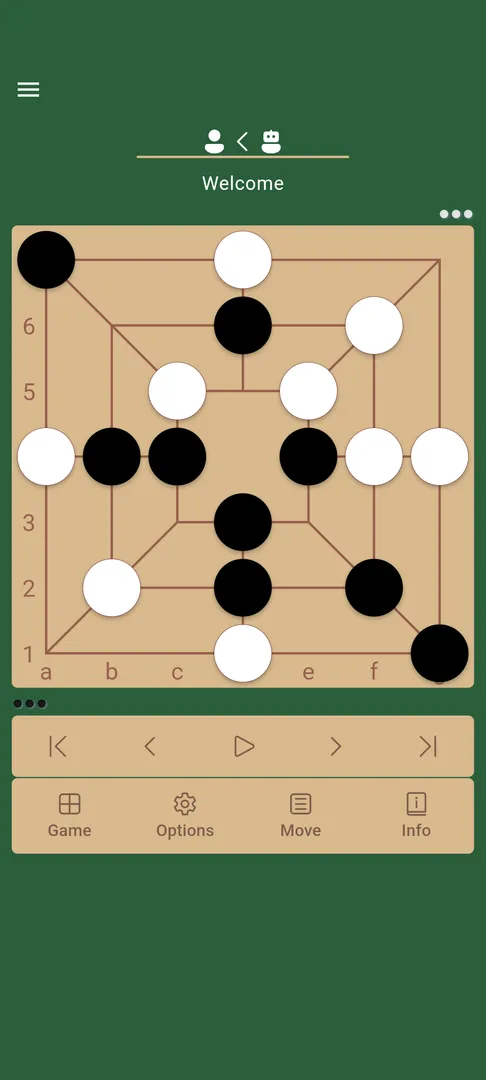
Mill, also called Nine Men's Morris, is a two-player abstract strategy game played on a board of three nested squares joined by lines. Players take turns placing pieces on the points where lines meet. When you form a row of three, you have made a mill and can remove one of your opponent's pieces. After all pieces are placed, players move them along the lines to form new mills.
This Android Mill app turns that board game into a digital version aimed at both newcomers and experienced players. You can play against the computer, play a friend on one device, or connect two devices over the same WLAN. Rule options let you switch the flying endgame rule on or off and toggle other common house rules.
Beyond the classic game, the Mill app includes several variants. Morabaraba is the South African variant, while Twelve Men's Morris and Lasker Morris are two other long-standing relatives of the classic game. The description only names the variants, so the exact rules for each are best checked inside the app.
The project is open source and maintained on GitHub, and it is localized into more than 60 languages. Accessibility is part of the design, with screen-reader labels and large-print board options.
Key features of Mill
Multiple game modes: Play Classic Nine Men's Morris along with Twelve Men's Morris, Lasker Morris and Morabaraba. Having the variants in one app means you can learn the classic rules first and then move on to related versions without installing separate games.
AI opponent with 30 levels: The Mill computer opponent offers 30 difficulty levels, so a beginner can start on an easy setting and a stronger player can keep moving up. The game statistics record your wins, losses and draws against each level, which shows how far you have progressed.
Play with a friend: Two people can share one device and take turns, or connect two devices over the same WLAN. Local network play is useful at home or in a classroom where everyone is on the same Wi-Fi network.
Flexible rules: You can enable or disable the flying endgame rule and toggle other common house rules. This lets the app match the version of the game you grew up with.
Visual themes and color picker: Choose from several board backgrounds and piece designs, then adjust the colors of the pieces and the board for better contrast. The color picker is practical for players who find the default colors hard to tell apart.
Sound packs, dark mode and haptics: Pick an audio theme for move feedback, switch to dark mode for low light, and adjust haptic feedback for moves. These settings make the app easier to use late at night or in a quiet room.
AI-powered positional analysis: The engine gives positional evaluations of your game. It helps you spot opportunities you missed and understand mistakes, which is more useful for improving than simply winning or losing against the computer.
Unlimited undo, redo and move list: Take back moves as many times as you want to test different ideas, and review the entire game in a scrollable move list. Combined with the analysis engine, this works like a study board.
Import, export and share games: Copy games to and from your clipboard, use the standard PGN file format, or open PGN files directly from your device. You can also take a screenshot and add tactical annotations to the board before sharing it.
60+ languages and accessibility: The interface is localized in more than 60 languages, including English, German, Chinese, Arabic and Spanish. Screen-reader labels and large-print board options are included, and a built-in feedback system lets you send suggestions or report issues.
Mill permissions explained
Mill requests several permissions. Here is what each one allows, based on the F-Droid listing:
Internet access: Lets the app connect to the internet. The documentation does not say exactly which feature uses it; the built-in feedback system is one plausible use, but this is not confirmed.
View Wi-Fi connections: Lets the app read information about Wi-Fi networks. This fits the option to connect two devices over the same WLAN for a game with a friend.
Camera: Lets the app take photos and record video. The description does not explain which feature uses the camera. It is a sensitive permission, so Android asks you before granting it and you can decline.
Write storage: Lets the app save and modify files in shared storage. This lines up with exporting games as PGN files and saving annotated screenshots.
Read storage: Lets the app read files in shared storage. The app can open PGN files from your device, which needs read access to those files.
View network connections: Lets the app check whether the device is online and which network type is used, for example before starting a game over WLAN.
Control vibration: Lets the app make the device vibrate. This supports the adjustable haptic feedback for moves.
On modern Android versions, sensitive permissions such as camera and storage are requested at runtime, so you decide when or whether to grant them. Normal permissions like internet, network state and vibration are granted at install.

How to download and install Mill APK
Tap the Download button on this page.
When Android asks, allow installs from your browser.
Open the downloaded file.
Tap Install.
Open the app and choose a game mode.
If you have not sideloaded an app before, our guide to installing APK files explains each Android prompt in more detail, including how to turn the install permission off again once you are done.
To update Mill later, download the newer APK and install it over the current one. F-Droid signs each build with the same key, so updates install on top of the existing app and keep your settings.

Is Mill safe?
The Mill app is released under the GPL-3.0-only license, so its source code is public and must remain available. You can read the code in the Sanmill repository on GitHub, and bugs or questions go to the issue tracker.
F-Droid builds this APK from the published source code and signs it with the F-Droid key. The file is downloaded from the official f-droid.org repository, and the package details are on the F-Droid listing. A source build means the installed app corresponds to code that anyone can review.
F-Droid lists no anti-features for Mill, which means it has not been flagged for issues such as advertising or tracking. The camera permission is the one item without a documented reason. Because it is a runtime permission, you can simply refuse it if the app ever asks and you do not want to grant it.
Mill system requirements
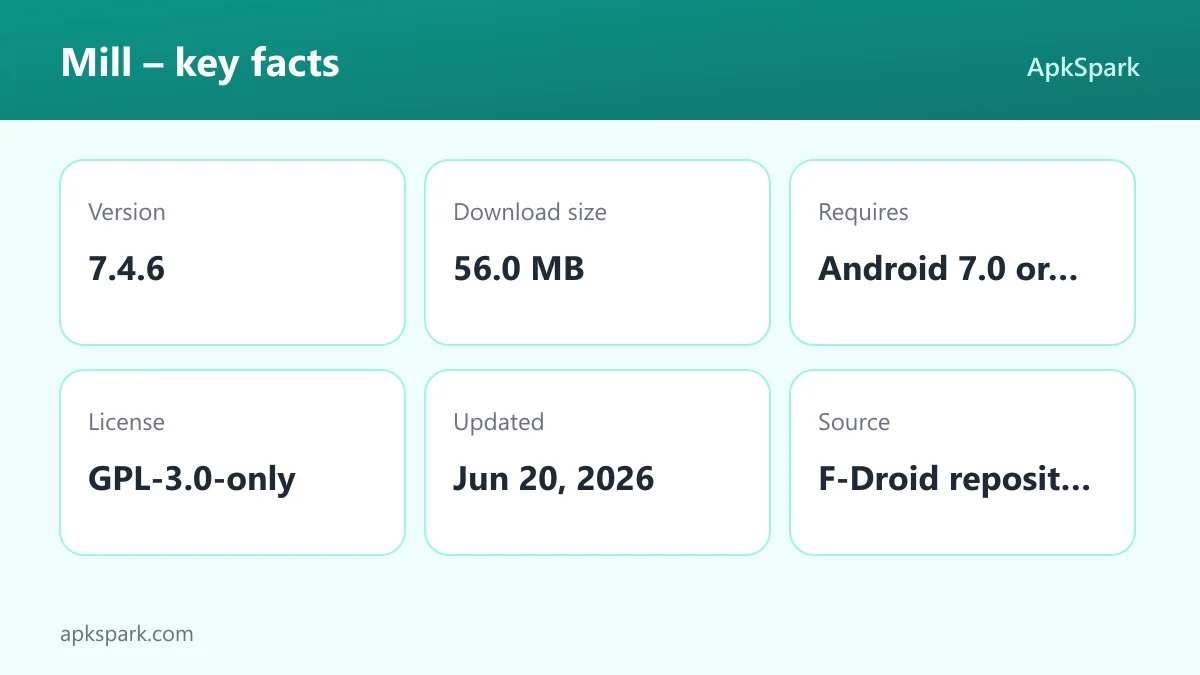
Minimum Android version: Android 7.0 or newer.
Download size: 56.0 MB.
Supported ABIs: arm64-v8a, armeabi-v7a and x86_64. A 32-bit x86 build is not listed.
Current version: 7.4.6, released on 2026-06-20.
Network: Only needed for WLAN games between two devices; local play on one device and games against the AI do not require it.
RAM and free storage requirements beyond the download are not documented. At 56.0 MB the app is larger than a typical board game, which is worth keeping in mind on phones with little space.
Who should use Mill?
Players who already know Nine Men's Morris will appreciate the rule options. The flying rule toggle, the house rules and the variants mean the Mill app can match the version you learned, rather than forcing a single rule set on you.
Learners and improvers get the most from the training tools. The 30 AI levels give a gradual difficulty curve, and the analysis engine, unlimited undo and move list let you study positions instead of just playing them. Statistics against each level show whether your play is improving.
Families, teachers and anyone new to Mill who wants an accessible board game should also look at it. Two people can play on one device or over the same WLAN, more than 60 languages are supported, and the screen-reader labels and large-print board options make it usable for more people.
It is less suited to people who mainly want to play strangers over the internet, since that mode is not documented. If your goal is quick casual games against random opponents, the local and WLAN options may feel limited. For solo practice, study and local play, the feature set is broad, and the 30 AI levels mean the computer remains a useful opponent for a long time as your skill grows.
A typical session in Mill
A practical way to start is to pick Classic Nine Men's Morris and a low AI level. During the placement phase, each side puts pieces on empty points, trying to build rows of three while blocking the opponent. Once all pieces are on the board, the movement phase begins and pieces slide along the lines to adjacent points.
After the game, open the move list and step back through it with undo. Turn on the positional analysis to see where the evaluation shifted, then replay the critical moves differently. If the game was interesting, export it as PGN or copy it to your clipboard to share.
As you win more often, raise the difficulty and check the statistics screen to see your record at each level. When the classic game feels familiar, try Twelve Men's Morris, Lasker Morris or Morabaraba for a change of pace.
Limitations of Mill to keep in mind
The documentation is detailed, but a few things are either absent or not explained. Knowing them up front helps you decide whether the app fits.
No documented internet multiplayer: Playing a friend works on one device or across two devices on the same WLAN. Matchmaking or remote play over the internet is not described.
Unexplained camera permission: The listing includes camera access without saying which feature uses it. You can decline it at runtime.
Larger download: At 56.0 MB, the Mill APK takes more space than many simple board games. If storage is tight, check your free space before downloading.
No 32-bit x86 build: The supported ABIs are arm64-v8a, armeabi-v7a and x86_64, so older 32-bit x86 devices are not covered.
Variant rules not spelled out: The description names Twelve Men's Morris, Lasker Morris and Morabaraba, but does not explain their rules, so expect to learn them in the app.
None of these is unusual for a free, community-maintained project, and the issue tracker is the place to ask about anything missing.
Using the Mill analysis tools well
The training suite is the part of the app that separates it from a plain board. The analysis engine gives positional evaluations, so after a loss you can find the move where things went wrong instead of guessing.
A simple routine works well. Play a game against an AI level slightly above your comfort zone. When it ends, scroll the move list to the start of the movement phase and step forward with redo. Each time the evaluation changes sharply, stop, undo the move and try another one. Repeat until you understand why the original move was weak.
Exporting games as PGN helps here too. You can keep a collection of instructive positions on your device, reopen them later, or send them to a friend who also plays Mill. Annotated screenshots work well for pointing out a single tactic, such as a double attack.
Tips for getting started with Mill
Use the cross points: The in-app strategy tips point out that cross points give your pieces more mobility, while corners allow fewer directions of movement.
Do not rush your first mill: According to the same tips, the first player to make a mill in the placement phase is often easily blocked. Building flexible positions tends to pay off more.
Watch for double attacks: A single move can threaten two points at once. Check for these on both sides before you place or move a piece.
Study with undo and analysis: Take back a losing move, ask the engine for an evaluation and try alternatives. Unlimited undo makes this cheap.
Set up the board for comfort: Use the color picker, large-print board options or dark mode if pieces are hard to see.
Match your house rules: Turn the flying rule on or off before playing so practice games follow the rules you use with friends.
Alternatives to Mill
No related apps are listed for this game right now. To compare it with other strategy and tabletop titles, browse more Board & Card apps on ApkSpark, where each listing shows its permissions, license and source.
The documented features that set this app apart are the variant support, the 30-level AI, the analysis engine, PGN import and export, WLAN play and the 60+ language localization. Other projects by the same team appear on the Calcitem Studio and Sanmill Developers page.
Final verdict
Mill is a thorough take on Nine Men's Morris. It goes beyond a simple board with four rule sets, a 30-level computer opponent, positional analysis, unlimited undo, PGN support and detailed statistics, all wrapped in a customizable and accessible interface.
It is open source, built by F-Droid and listed without anti-features. The main things to weigh are the 56.0 MB download and the undocumented camera permission, which you can decline. For anyone interested in the game, it is a solid choice.